
Using HandShake
This page shows how to use the Lilygo T-Watch S3 and the Lilygo T-Embed to work as the handshake project. This page assumes that you have already programmed both devices with the HandShake firmware.
Summary
Turn on the watch using a long press on the button.
Shake the watch gently and check that this is detected as a switch by the receiver unit. Do this test shake as soon as the receiver is plugged in: the first shake after plugging in sends its keystroke about half a second late (see The first shake after plugging in the receiver).
Adjust the level of shake that will trigger a switch action using the jog dial on the receiver, followed by a long press on the button in the middle of the jog dial. This sends the new shake detection threshold to the watch.
HandShake components
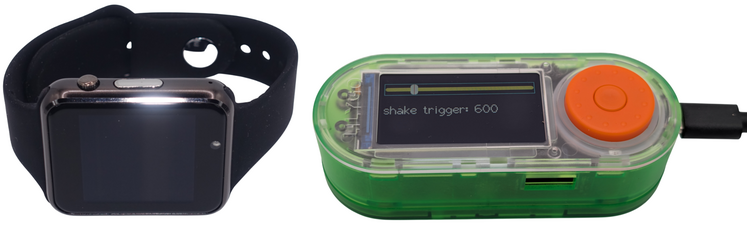
The HandShake system comprises two parts, a smart watch (Lilygo T-Watch S3) and a receiver unit that sends a keystroke to a communication device (Lilygo T-Embed) through a USB cable. The two devices are shown in the photo below.
When the watch starts, it shows a start-up screen for about two seconds:
firmware
2026-10-09d
reset:
power on (1)
The date on the second line is the firmware version. The Firmware changes page lists what changed in each version.
The last two lines say why the watch started. When you turn the watch on with the button, they show power on (1), the normal start. Anything else, such as watchdog or brownout, is explained in what the reset line means. If the start-up screen keeps coming back every few seconds, the watch is restarting: see Watch keeps restarting every few seconds.
Watches with firmware older than 2026-10-09d show only the first two lines.
The T-Embed shows the same, with the reason on the third line, e.g. reset: power on (1).
When the watch has booted up, which takes a few seconds, you will see the display below:
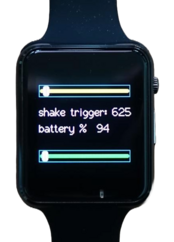
The screen has two sliders:
- The top slider (yellow) shows the trigger level, the amount of shake needed to operate your communication software. Its value is also shown on the watch screen as ‘shake trigger: xxx’ where xxx is a number that varies from 525 to 1000 (these limits may change). The lower the number, the softer the motion required to trigger a shake detection. This slider only changes when you send a new trigger level from the receiver.
- The bottom slider (green) shows how close the latest movement came to triggering. It updates in real time.
The bottom slider runs from the watch at rest (empty) to the trigger level (full). Once it reaches the right-hand end, the shake detection is triggered. If you change the trigger level from the receiver, the green slider rescales to match, so a full bar always means a trigger.
The green slider keeps the strongest movement of the last moment and then falls back over about a second, so even a short sharp punch is visible. If the watch is set to detect a roll rather than a punch, the green slider shows the strength of the roll.
When an intended shake is detected this display is shown on the watch:
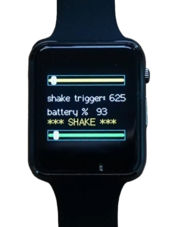
The line below the battery reading is the watch’s status line. It shows *** SHAKE *** or *** NO LINK *** briefly after a gesture and is otherwise empty. If the watch has a lasting problem, the message stays there and comes back after each gesture:
- – NO SAVE –: the watch cannot store its settings. It runs with the built-in trigger level and a new level sent from the receiver is lost when the watch restarts. Reflash the firmware.
- - TASK FAIL -: the watch could not start one of its internal tasks. Restart the watch. If it comes back, reflash the firmware.
Watches with firmware older than 2026-10-09b lose these messages after the first gesture.
If the watch cannot reach the receiver, the status line shows *** NO LINK *** and keeps showing it until the receiver answers again. The watch checks every five or so seconds, so this appears without a gesture and clears by itself when the receiver is back in reach. It does not buzz for this: only a gesture that did not get through gives the three quick clicks. See If the watch shows NO LINK. Watches with firmware older than 2026-10-13 only show NO LINK after a gesture.
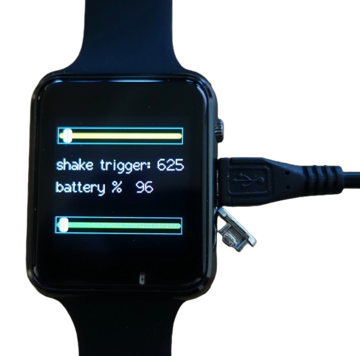
To charge the watch, attach a USB cable to the micro USB socket in the side of the watch and connect to a USB socket or charger. For whatever reason, once the watch battery is at 0% it stays at 0% for an age while charging then starts ramping up to 100% fairly quickly. I don’t know how to improve this yet.
Setting up the receiver unit
The T-Embed receiver unit is powered from the USB-C socket on its side.
The receiver has a jog dial around the button. This dial is used to adjust the trigger threshold. Use the dial to set a new trigger threshold then send this new value to the watch by giving a long press (about 2s) to the button in the middle of the dial. Turning the jog wheel clockwise will increase the amount of shake needed to send a trigger to your communication device, turning the jog wheel anti-clockwise decreases the amount of shake needed to send a trigger to your communication device. The updated trigger will not take effect in the watch until you give a long press on the button though. Check the watch to see that the new shake value is shown on the watch display.
The button on the receiver can be used to adjust the sensitivity of the gesture detection algorithm running on the T-Watch:
A short press: The receiver asks the watch for the largest shake it measured over the last 5 seconds and shows that value on the receiver display. Ask the person wearing the watch to make the gesture you want to detect, then give a short press to see how strongly that gesture registered. Set the trigger threshold a little below the value you see, so the gesture is detected reliably without every small movement triggering it.
A long press: The receiver sends the trigger threshold shown on the receiver display to the watch.
This allows the sensitivity of the gesture that is detected to be adjusted without having to touch the T-Watch.
The first shake after plugging in the receiver
The first shake after the receiver is plugged in sends its keystroke about half a second late. Every shake after that sends its keystroke straight away.
So as soon as the receiver is plugged in, make a test shake and check that the keystroke reaches the communication device. Do this each time the receiver is plugged in or has lost power, before it is needed. The test sends a keystroke to whatever is open on the communication device, so choose a moment when that does no harm.
This delay cannot be avoided. It is the price of keeping the receiver easy to reprogram. Until the first shake the receiver keeps the connection that lets the Device Flasher reprogram it without pressing any buttons. The first shake turns it into a keyboard and the communication device then needs a moment to recognise the new keyboard. The receiver waits for that moment before sending the keystroke, so that it is not lost. Starting the keyboard as soon as the receiver is plugged in would remove the delay, but then reprogramming the receiver would mean holding its button down while plugging it in.
Because of this, the receiver can only be reprogrammed from the website before its first shake. To reprogram it, unplug it, plug it back in and use the Device Flasher before shaking the watch.
Receivers with firmware older than 2026-10-20 may not send a keystroke at all for the first shake after plugging in.
Checking on the watch from the receiver
The watch tells the receiver its battery level every five or so seconds. The bottom line of the receiver’s screen shows what it last heard:
- watch OK 85%: the watch is in reach and its battery is at 85%.
- watch charging: the watch is on its charger.
- watch LOW 15%: the watch’s battery is at 20% or less. The ring around the dial flashes amber every two seconds. Charge the watch soon.
- *** NO LINK ***: the receiver has not heard from the watch for 20 seconds. It clicks three times and the ring flashes red every two seconds. The clicks repeat every five minutes until the watch is heard again.
The person wearing the watch may not be able to tell you it has stopped working and someone who has gone quiet can look as if they have nothing to say. If the receiver shows NO LINK, check that the watch is switched on, charged and within reach of the receiver. When the watch is back, the line returns to watch OK and the flashing stops.
The clicks play even when Audio is switched off on the configuration page. That switch only turns off the click for each gesture.
When the receiver starts it shows *** NO LINK *** until it first hears from the watch, but it does not click or flash for that, so a receiver switched on with no watch nearby stays quiet. A watch with firmware older than 2026-10-13 never tells the receiver its battery level, so the receiver shows NO LINK and stays quiet. Flash both devices with new firmware to use this.
None of these warnings is ever sent to the communication device, so they cannot make a selection.
Comments
Comments are public. Please don't name anyone who uses HandShake, or say that someone took part in our research, unless it is you and you are happy for everyone to read it. You can comment with just a name, or sign in with GitHub. Our privacy notice explains what is stored.